Documents and approvals ›

Document AI (OCR)

Turn scanned documents, invoices and forms into searchable data.

Document AI (OCR)Sample data
Siam Office Supply Co., Ltd.88/12 Rama 9 Rd, Huai Khwang, BangkokTAX INVOICE
No. IV6910-0457Date 3 Oct 2026Tax ID 0105556123456
DescriptionAmount
A4 paper 80 gsm, 20 reams2,400.00
Laser toner, 4 boxes9,800.00
Lever arch files, 301,350.00
Grand total14,498.50
Extracted fields
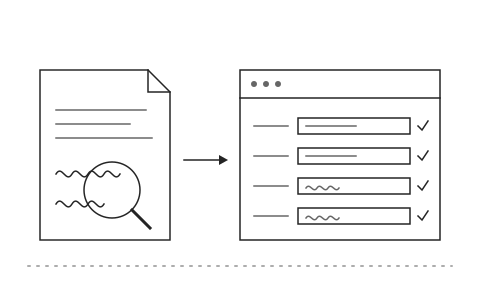
AI reads print and handwriting and splits it into fields

Go ahead and try it. This screen simulates the system with sample data.

Highlights

Reads Thai and English, both printed and handwritten

Reads Thai and English, both printed and handwritten

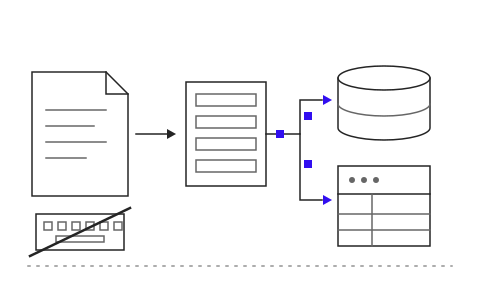
Sends data into ERP or accounting systems without rekeying

Sends data into ERP or accounting systems without rekeying

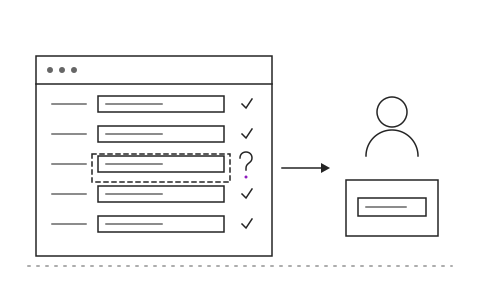
People review only the fields the AI is unsure about

People review only the fields the AI is unsure about

What Document AI (OCR) is and how it helps your organisation

Every day the accounting and purchasing teams receive dozens of tax invoices, delivery notes and forms on paper or as PDFs. Staff key the figures into the system field by field, lose hours to repetitive work, and when a digit is wrong the correction ripples through the whole month. Thai handwriting and tables make it worse, because generic OCR tools simply cannot read them.

Khaojai IT's Thai OCR and Document AI takes a scan or a photo and lets the AI read Thai and English, printed and handwritten, including tables and stamps. It then extracts each field automatically, such as document number, date, vendor and amount. Fields the AI is not confident about are routed to a person for a quick check before the data is sent into your ERP or accounting system.

After go-live the accounting team stops rekeying. Every document becomes data that can be searched and audited later, typing errors fall away and the books close faster. Khaojai IT configures the OCR for the document types your organisation actually handles and connects it to the accounting or ERP system you already use.

Questions buyers ask before starting

How accurately does the OCR read Thai handwriting

The AI reads clearly written Thai handwriting well and shows a confidence level for every field. Low confidence fields are sent to a person first, so no wrong value enters your system unseen.

Can it send data into the accounting or ERP system we already use

Yes. It connects to SAP, Express, Oracle and other accounting systems through APIs or import files. If your current system has no API, our team designs an integration that fits your organisation.

How long does implementation take

It depends on how many document types you have. Typically 1 to 3 months, starting with the single document type that has the highest volume and expanding from there.

Is the document data secure and PDPA compliant

The system runs on your own servers or on cloud infrastructure in Thailand, whichever you choose, with access permissions and a complete usage log that supports PDPA requirements.

AI in this system

AI reads Thai handwriting and tables and extracts each field automatically.

  1. 01Read Thai handwritingTurns handwritten Thai and English on forms into editable text.
  2. 02Extract table dataSplits invoice tables into rows and columns like items, quantities and totals.
  3. 03Map fields automaticallyFinds the number, date or vendor even when form layouts differ.
  4. 04Score its confidenceRates every field so only doubtful ones go to a person for review.

Works with the systems you already use

LINEMicrosoft 365Google WorkspaceSAPExcelExisting systems through APIs

Questions about Document AI (OCR)?
Tell us about it

Describe the problem your organisation faces. Our team and AI will recommend the right software and help you think it through.